Scanning Bhatkhande Notation with Claude Vision
Bhatkhande notation isn't a character set, so OCR doesn't apply and no model has meaningful training data on it. Four things took this pipeline from confidently wrong to useful, and the one that mattered most was giving the model a reference in the same modality as the problem.
Hindustani classical and Sikh devotional music is written in Bhatkhande notation — Carnatic music uses a different system entirely. There are thousands of published books in it. None of it is machine readable, so anyone who wants to play from a book and edit what they play has to retype it by hand, mark by mark.
I run two subscription products where people write and play this notation — Kirtan Notation and Sangeet Notation, two brands on one codebase — so "point your phone at the page and get editable notation back" is the feature that would save subscribers the most time. It took a while to get working, and the thing that finally worked was not the thing I expected.
This is what comes out the other end — the same notation, structured, editable and playable:
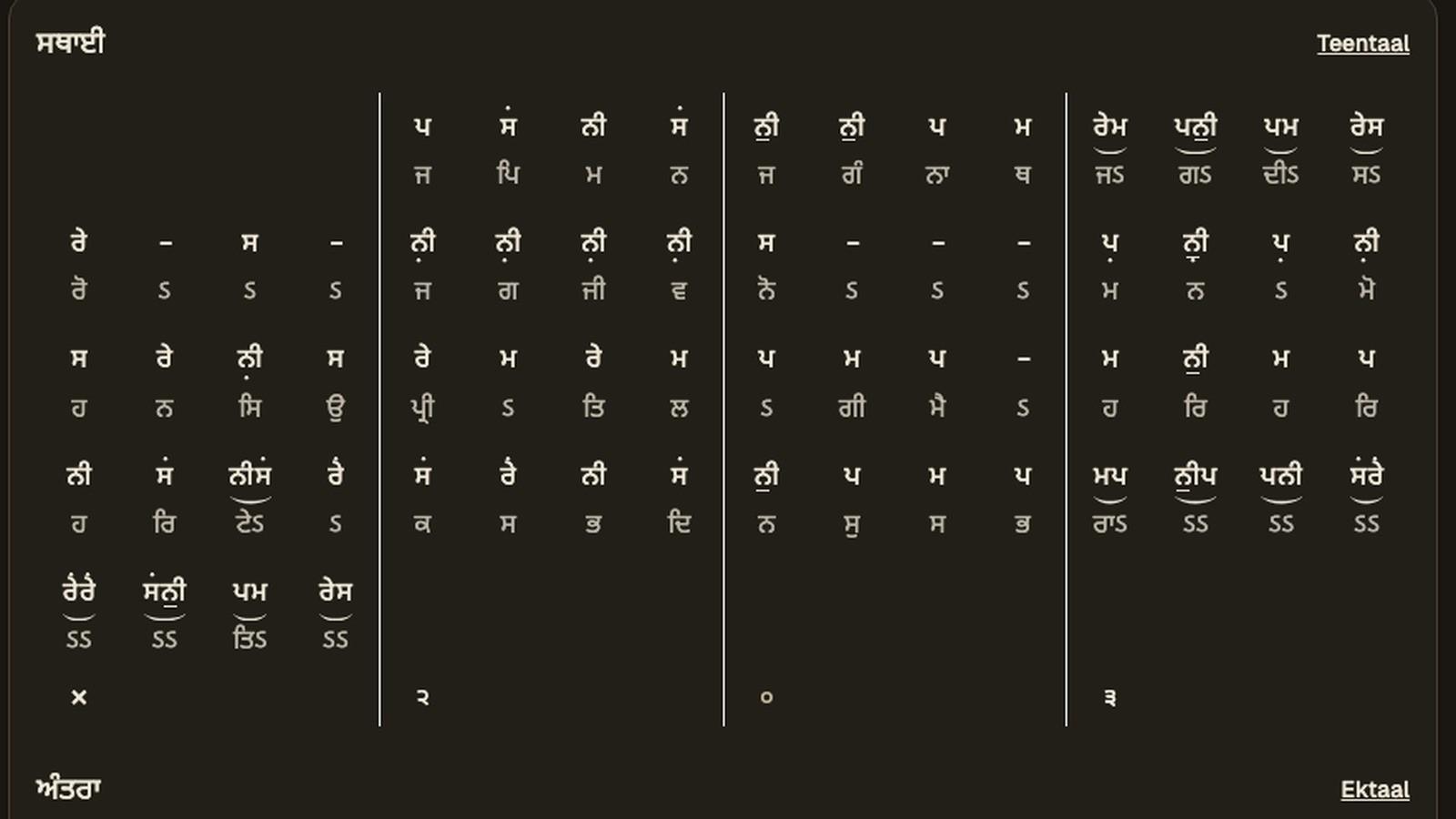
This isn't live for subscribers yet — only admin accounts can run a scan today. Wider release may come later.
Why OCR does not apply
Bhatkhande isn't a character set with a Unicode block you can recognise.
The swaras are ordinary letters — Gurmukhi, Devanagari or Latin. If that were all, this would be a solved problem. But the meaning lives in what surrounds them:
- Octave dots above or below the letter, with different positions for mandra and taar, and a separate ati form beyond each
- Kan swars — grace notes, printed small and raised beside the main note
- Meend — a glide, drawn as a bar spanning several notes, which can cross a beat boundary
- Chhand markers above the beat
- Beat and row structure, where the taal fixes how many beats a row holds
A dot above a letter isn't a glyph in a line of text. It's a spatial relationship, and so is nearly everything else that matters. The layout carries as much meaning as the letters do. OCR gives you the letters and throws away the music.
First attempt: hand the model the photo
I started multi-provider — OpenAI, Gemini, Anthropic — on the theory that this was a hard vision task and the biggest available model would win.
The output was confidently wrong in a specific way. Notes in roughly the right sequence. Octave markers dropped or invented. Kan swars silently absorbed into the note beside them. Beat counts that didn't match the taal. It was never gibberish, which made it worse — you had to know the notation to see that it was wrong.
Describing the rules in prose didn't help much. I wrote increasingly precise English about where dots sit and what a kan swar looks like. The model got more confident and not more correct.
That's the signal, in hindsight. When a model is wrong in a plausible, pattern-completing way rather than a confused way, it is usually filling a gap rather than misreading your instructions.
The thing that worked: a reference in the same modality
The model has never seen Bhatkhande notation. No amount of describing it in words changes that, because the problem is visual and the description isn't.
So I stopped describing and started showing. I generate a reference sheet from the notation font — every swara, every octave form, kan, meend, ghaseet, chhand, each rendered as it actually appears on a page — and send that image in the prompt alongside the photograph.
The model now has a visual lookup table for marks it was never trained on. It isn't learning the notation system. It's being handed a key, in the same modality as the problem, and doing the matching it is already good at.
This is the single highest-leverage change in the whole pipeline. It beat every prose description I wrote, it is inspectable when it fails — you can look at the reference sheet and see what was ambiguous — and regenerating it takes an afternoon rather than a fine-tuning run.
The general form, which I now reach for first: if the problem is visual, give the model a reference that is also visual. Describing a domain in words is a substitute for knowledge, and a poor one.
Domain conditioning: make wrong answers detectable
The second change narrows what a legal answer can be.
A raga admits certain notes and forbids others. A taal fixes the number of beats in a row. Both are known before the scan runs — the user picks them in the UI — so both go into the prompt as constraints, and both come back out as post-processing checks.
This does two things. The model produces fewer illegal answers. And the illegal ones it does produce become detectable, because a note outside the raga or a row with the wrong beat count is mechanically wrong rather than a matter of judgement. You can't correct what you cannot detect.
Where It Runs
All of this is a Supabase edge function — Deno, server-side, one HTTP endpoint the app calls.
The reason is mundane and non-negotiable: the Anthropic API key. A vision call from the browser means shipping the key to the browser, so the pipeline has to live somewhere the user cannot read. Everything else about the design follows from being in a function rather than in the client.
Two constraints came with it, and both are worth knowing before you copy this.
A size ceiling. The function rejects anything over 5MB and accepts only JPEG, PNG and WebP:
const ALLOWED_MIME_TYPES = ['image/jpeg', 'image/png', 'image/webp'];
const MAX_IMAGE_SIZE_BYTES = 5 * 1024 * 1024;
Modern phone photos blow straight through that. So the client compresses before uploading, above a threshold, capping the long edge at 2048px:
if (file.size > COMPRESS_ABOVE_BYTES) {
  imageFile = await imageCompression(file, {
    maxSizeMB: 1.5,
    maxWidthOrHeight: 2048,
    useWebWorker: true,
  });
}
2048px is the number I would tune first if accuracy ever regressed. Compress a page of dense notation too hard and the octave dots — the smallest marks, one or two pixels across at the wrong scale — start disappearing into JPEG artefacts. The whole pipeline can be perfect and still fail because a dot did not survive the upload.
Everything is base64 over JSON. The image and the font reference both go to the model as base64, so the page is base64 twice — once into the function, once into the API call. It works, and it is the reason the size ceiling matters more than it first appears.
The App Already Knows the Grid
This is the one I would have missed if I had started from the model instead of from the product.
Scanning does not happen on a blank page. By the time someone uploads a photo they have already created the composition in the editor — picked the taal, named the sections, maybe typed the first few beats. The app knows the shape of what is on that page before it ever calls the model.
So it sends that shape:
interface SectionHint {
  name: string;       // "Sthayi", "Antara"
  rows: number;       // how many rows this section occupies
  emptyBeats: number; // leading beats with nothing in them yet
}
None of it is guessed. rows falls straight out of the taal:
const beatsPerRow = taal?.beats;
if (!beatsPerRow) throw new Error(`no taal for section ${section.name}`);
const rows = Math.ceil(section.beats.length / beatsPerRow);
The taal fixes beats per row — sixteen for teentaal, eight for keherwa — so the number of sections plus the beat count per section is the grid. The pipeline refuses to run without a taalId for exactly this reason: without beats per row there is no grid to describe, and the model is back to inferring layout from pixels.
emptyBeats is the small one I like most. It counts the leading beats that already have notes, so a half-typed section resumes rather than restarting:
let emptyBeats = 0;
for (const beat of section.beats) {
  if (beat.notes && beat.notes.trim()) break;
  emptyBeats++;
}
// If every beat is empty, reset to 0 — the whole section needs scanning.
if (emptyBeats === section.beats.length) emptyBeats = 0;
Same principle as the font reference sheet, arriving from a different direction. The model was guessing at layout. The layout was sitting in the editor the whole time.
Fan Out Per Section, Not Per Page
Once you have the section list, the next decision makes itself.
One call over a whole page loses fidelity. The model does a good job on the first section and drifts through the rest — attention spread over a full page of dense marks is worse than attention on one section of it.
So each section gets its own call, with its own hint, in parallel. Better output, and latency stays close to a single call because they run concurrently.
That decision creates the next problem.
The cost problem, and where the caching actually goes
Every section call needs the same context: the system rules, the font reference sheet, and the notation image itself. Naively, N sections means re-sending all of that N times. The font reference and the page photo are the two largest things in the request.
Prompt caching fixes it, but only if the breakpoints are in the right order. The rule is that a cached prefix is matched by exact prefix, so everything stable has to come before anything that varies. Three breakpoints, in this order:
- The stable system rules, before any hint text. Hints vary per scan; the rules don't.
- The font reference image. It sits before the notation image deliberately — a different page with the same taal, raga and settings still reads this much of the prefix.
- The notation image, the last block every section of this scan shares.
The section-specific instruction goes after all three, so it never becomes part of the cached prefix.
Then the part I did not expect to need. If you build that prefix and immediately fan out N concurrent calls, all N race a cold cache and each one pays the cache-write premium. That is strictly worse than not caching at all.
The fix is a warm-up call before the fan-out, with max_tokens: 0 — the input is processed, the cache is written, and it returns immediately with empty content and no output tokens billed:
await postMessages(apiKey, {
  model,
  max_tokens: 0,
  system: prefix.system,
  messages: [{
    role: 'user',
    // Placeholder sits AFTER the last breakpoint, so it never becomes part of
    // the cached prefix the real section calls read back.
    content: [...prefix.content, { type: 'text', text: 'warmup' }],
  }],
});
N cache writes become one write plus N reads.
Two details around it that are easy to get wrong:
Do not warm a single-section scan. One section shares its prefix with nobody, so the warm-up is pure overhead. The code checks sectionHints.length > 1.
Build the prefix once. Rebuilding it per section would produce equal strings, so it would work — but the cache depends on the bytes being identical, and building it once makes that invariant explicit instead of accidental.
A failed warm-up is swallowed and the scan proceeds cold. A cold cache is a cost regression, not a broken feature, and I would rather bill myself than fail a user's scan.
Parse leniently, validate strictly
This is the part where I had to unlearn something.
I shipped strict JSON parsing first, because that is what you are supposed to do. In production it threw away responses that were substantively correct — the right notes, the right octaves, the right beat counts — because of a trailing comma, or because the model wrote two paragraphs of analysis before the JSON.
So the parser is deliberately forgiving. It handles pure JSON, code-fenced JSON, and JSON embedded in prose. When there are several fenced blocks it takes the last one, because earlier fences are usually examples the model quoted back at itself. It falls back across the response shapes.
And then the meaning is validated hard: beats against the taal, notes against the raga, octave consistency across the row.
A response that parses cleanly but claims a note the raga forbids is far more dangerous than one with a stray comma — and strict JSON parsing catches exactly the wrong one of those two. Validate the semantics you care about, not the serialisation.
Post-processing that knows the domain
The last layer fixes classes of error the model reliably makes.
My favourite, because of how quietly it fails: the ati octaves — a full octave above or below — are one character in storage, U or L, not a doubled uu or ll. The tokenizer reads a single octave character, so suu renders on screen exactly like su and plays a whole octave off. It looks right and sounds wrong. The prompt asks for the single-character form; a vision model will still sometimes double the letter; so the doubled form is folded back after the fact rather than stored.
There is also octave-consistency repair — a middle-octave note sitting between two upper-octave neighbours gets promoted, because a single-note octave dip in the middle of a phrase is far more likely to be a missed dot than a real leap — and raga-constrained note correction, and a pickup-beat octave fix.
None of this is clever. All of it is the accumulated residue of looking at wrong output and asking what the model was systematically getting wrong, rather than what it got wrong once.
Then I Measured It
Added a few weeks after this was first published.
For a long time the honest answer to "how accurate is it?" was "roughly 90% on printed pages in manual testing" — which has no denominator, no definition of correct and no interval. It stayed that way for months, including while I was writing everything above.
I eventually built the eval. It found three bugs before it produced a single number, showed me that effort and model choice both move the result more than I expected, and that the same configuration scored 59.4%, 59.4% and 90.6% on one page. That is its own post.
What transfers
Three things I would tell someone starting on a domain a model has never seen:
Give it a reference in the same modality as the problem. This is the one worth leading with. Describing your domain in prose is a substitute for knowledge and it does not work nearly as well as a lookup table the model can look at.
Make wrong answers detectable. Domain constraints are worth more as validators than as instructions.
Cache-breakpoint order is an architecture decision, not a flag. Ordering your prompt by volatility, warming the prefix before you fan out, and knowing when not to warm it, is the difference between caching helping and caching costing you money.
Up & Running with Vue.js 2.0 by creating a simple blog application
In this article we will be Up & Running with Vue.js 2.0 by creating a simple blog application
Build an app with Laravel5 (backend) and Angularjs (frontend) - Part 1
In this part 1 of the series we will take a look at how to build the api using Laravel